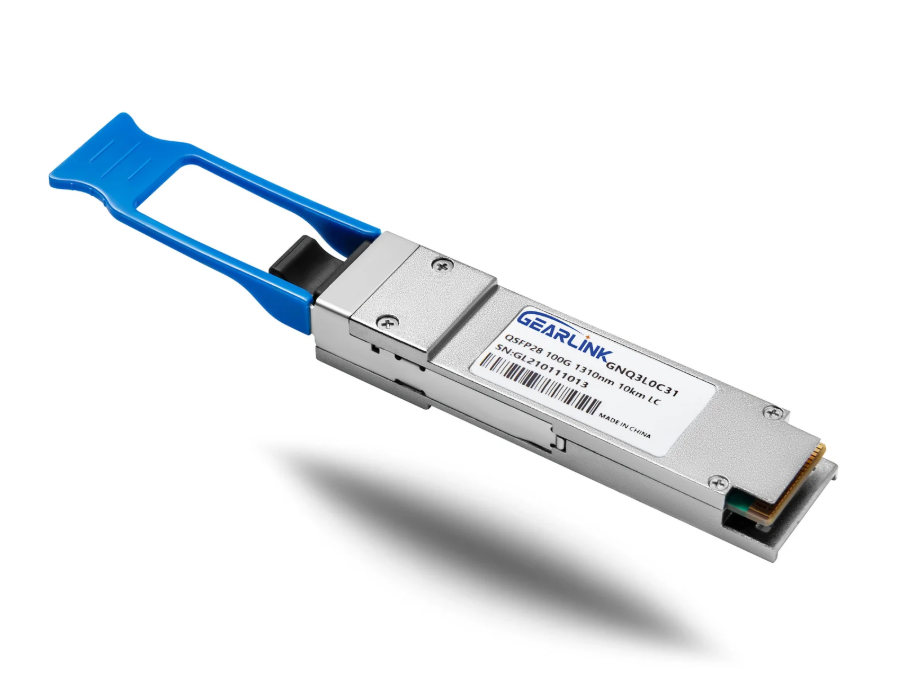
Have you ever needed to connect a new high-speed switch to an older 10 Gigabit device? At first glance, the physical ports might look completely incompatible. On the one hand, a modern switch proudly offers 100 Gigabit QSFP28 ports; on the other hand, a server or legacy switch still relies on standard 10G SFP+ interfaces. This situation forces a difficult dilemma: upgrade all the old equipment immediately or leave the new switch’s ports largely unused.qsfp28 to sfp+
Thankfully, there is an elegant way to solve this problem. A QSFP28 to SFP+ adapter is purpose-built to bridge this gap effectively. Designed to fit into a QSFP28 slot, this compact module cleverly accepts any standard SFP+ transceiver or cable. Therefore, a high-speed port can be quickly transformed into a functional 10 Gigabit connection without replacing the entire device.
From a strategic perspective, this simple device is a game-changer for budget-conscious network managers. It avoids a disruptive “rip and replace” upgrade cycle while maximizing the return on investment for existing assets. Throughout this guide, the fundamentals of QSFP28 to SFP+ conversion will be thoroughly explored. Specifically, this covers how these adapters work, what to consider before buying one, and the best way to deploy them for stable performance. After reading, you will have a clear action plan for integrating 10G gear into a modern 100G ecosystem.
What is a QSFP28 to SFP+ Adapter? Understanding the Basics
To appreciate the value of this component, understanding the two distinct worlds it connects is essential. A QSFP28 to SFP+ adapter is not just a simple passive connector; it is a sophisticated interface translator housed in a QSFP28 form factor.
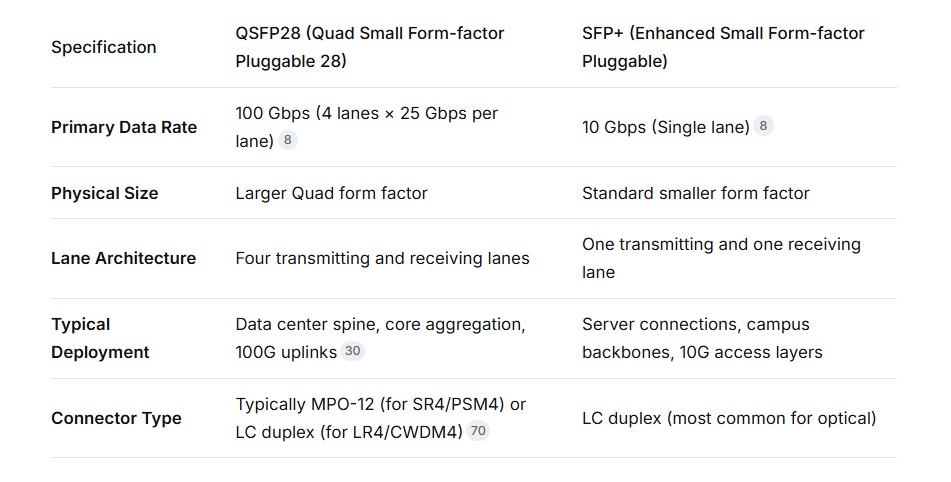
The Two Interfaces at a Glance
Below is a quick comparison table that highlights the core differences between the two technologies:
How an Adapter Achieves Interconnection
Before the adapter is examined, it is crucial to understand a key point: the two ports are not directly backwards compatible. Their different electrical and mechanical specifications prevent a direct cable connection. However, the QSFP28 to SFP+ adapter solves this by physically housing an SFP+ cage inside a QSFP28 shell.
When the adapter is inserted into a 100G port, the device only recognizes one electrical lane out of the four available in the QSFP28 specification. This connectivity is typically handled by Lanes 1 or 4, which are mapped to the inserted SFP+ transceiver. Consequently, the other three high-speed lanes are effectively put into a standby or disconnected state, but this is a normal design feature.
Because of this design, the 100G port is essentially “downgraded” to behave like a 10G port for that specific connection. As a result, it communicates with the SFP+ module at the lower speed. This method ensures that the legacy SFP+ equipment is not overloaded or damaged by signals it cannot process.
Supported Media Types
The versatility of a QSFP28 to SFP+ adapter is one of its strongest selling points. It functions as a universal receptacle, accepting virtually any type of SFP+ media available in the market. The full range of supported cables includes:
– Standard SFP+ Optical Transceivers (10GBASE-SR, LR, ER, etc.)
– SFP+ Direct Attach Copper (DAC) passive cables for short rack connections
– SFP+ Active Optical Cables (AOC) for medium-range interconnects
– SFP+ Copper (10GBASE-T) modules for RJ-45 connectivity
This plug-and-play compatibility makes the QSFP28 to SFP+ adapter an indispensable tool in any network engineer’s kit. A single adapter can be reused for countless different media types as network needs change over time.
The Strategic Value of Using an Adapter for QSFP28 to SFP+ Connections
Implementing QSFP28 to SFP+ connectivity using an adapter provides tangible financial and operational benefits. Rather than viewing it as a temporary hack, it should be recognized as a legitimate architectural strategy designed to prolong equipment lifespans.
Financial Savings and Infrastructure Protection
The most immediate benefit is cost reduction. Consider a high-density 100G top-of-rack switch, which may cost tens of thousands of dollars. If your current servers operate at 10G, but you plan to upgrade to 25G or 100G in three years, purchasing those 10G servers today using adapters protects the switch investment. When the servers are upgraded, the adapters are simply removed, and the native 100G SFP28 modules are inserted.
From a quantitative standpoint, the sheer volume of SFP+ transceivers already deployed in the world is enormous. Replacing them all simply because a switch was upgraded is not a sustainable or cost-effective strategy. The adapter allows these existing optics to be preserved, which often yields a net savings far greater than the price of the adapters themselves.
Enhanced Port Density and Breakout Capabilities
Although an adapter uses only one lane of the port, some platforms allow the unused lanes to be utilized if the adapter is used in conjunction with a special breakout cable. In such cases, a single 100G port can theoretically be split to serve four separate 10G connections. However, this feature is often platform-specific and is more commonly associated with breakout cables (discussed in the next section) rather than simple single-port adapters.
By using QSFP28 to SFP+ adapters, you ensure that every physical port on the switch can be utilized today, even if your traffic patterns do not yet require 100G speeds. This also simplifies capacity planning, as future upgrades only require replacing the adapter with a native 100G optic.
Simplified Network Migration Paths
A phased migration strategy is often the most practical for growing data centers. The QSFP28 to SFP+ adapter plays a pivotal role in this by enabling the transition from 10G to 100G to happen in stages.
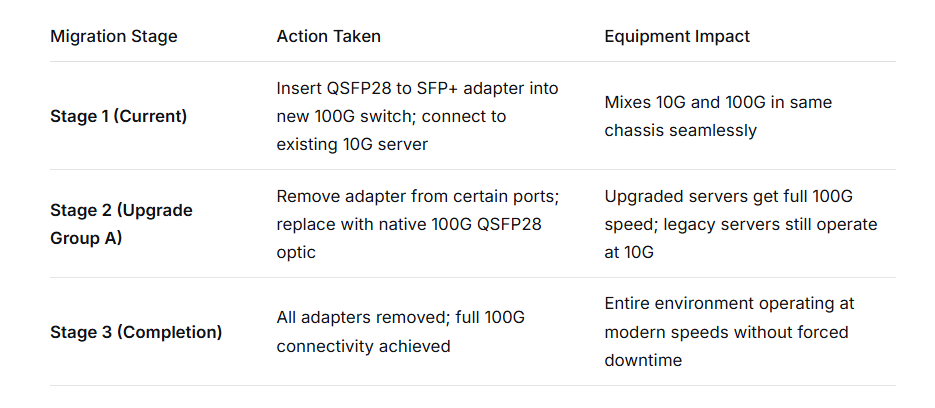
This structured approach helps avoid the “flag day” risk, where the entire network must be taken offline to complete an upgrade. Consequently, the adapter is a highly effective risk-management tool for migration projects.
Exploring Alternative Solutions: Breakout Cables vs. the QSFP28 to SFP+ Adapter
While the QSFP28 to SFP+ adapter is ideal for converting a single port, it is not the only solution available for mixing 100G and 10G technologies. Understanding the alternatives prevents mismatched expectations during the purchasing process.
Option 1: QSFP28 to 4 x SFP+ Breakout Cable
A breakout cable takes a very different approach. Instead of connecting one port to one port, it connects one QSFP28 port on the switch side to four separate SFP+ connections on the device side.
This is only possible if the host switch supports port breakout mode. When enabled, the switch’s internal chipset treats the four lanes of the QSFP28 port as four independent interfaces. In contrast, the adapter discussed previously forces the port to recognize only one lane. Therefore, a breakout cable effectively multiplies the port count on the switch.
Key considerations for breakout cables include:
– The length of the breakout cable is typically fixed (e.g., 1m, 2m, 5m) limiting deployment flexibility.
– Four new IP addresses or interface configurations are required on the switch side.
– Not all operating systems or switch models support 4×10G breakout specifically; some only support 4×25G.
Option 2: QSFP28 to SFP+ Adapter (Single Port)
For existing environments where only one server or device is being connected per port, the adapter is the simpler and more elegant solution.
Key advantages of the adapter over breakout cables include:
– The ability to use any length of fiber using standard SFP+ optics.
– No special “breakout mode” configuration is needed on most devices.
– You can change media types (fiber to copper) by simply swapping the SFP+ module, not the whole adapter.
– It consumes only one port configuration on the switch (the port simply runs at 10G).
Side-by-Side Selection Matrix
To assist with decision-making, here is a comparison matrix that clarifies which solution best suits various scenarios:
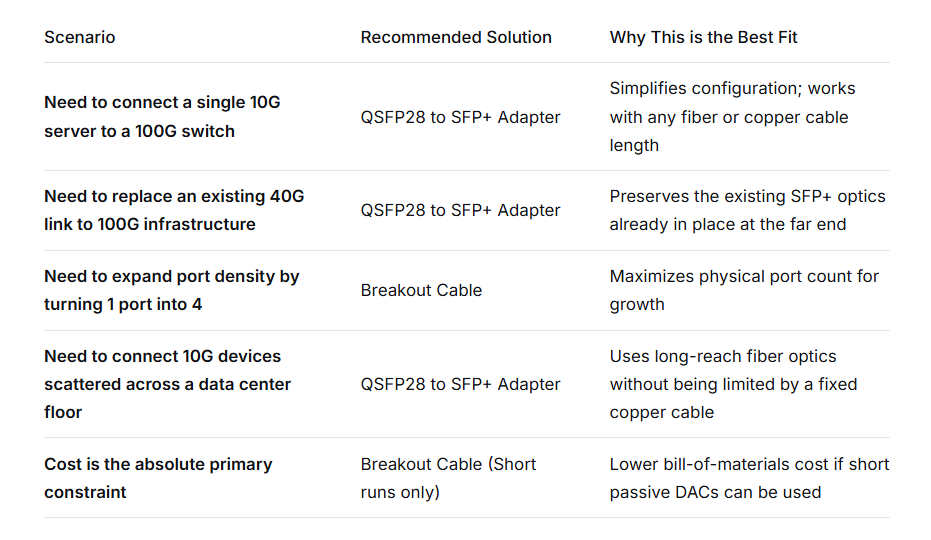
In summary, the QSFP28 to SFP+ adapter wins in scenarios requiring flexibility and distance. For the majority of mixed-speed upgrades, it is generally the go-to choice for network architects.
Step-by-Step Deployment: Using a QSFP28 to SFP+ Adapter in Your Network
Once the decision is made to purchase the adapter, proper deployment ensures a trouble-free experience. While the physical insertion is straightforward, several software and hardware dependencies must be verified.
Phase 1: Device Compatibility Verification
Before the adapter is inserted, the host device (switch, server NIC, or router) must be checked for compatibility. Although the adapter follows the QSFP28 MSA (Multi-Source Agreement), some vendors restrict the use of third-party modules through software locks.
Where to find compatibility information:
– The switch’s hardware manual under “Supported Transceivers”
– The vendor’s official compatibility matrix (often updated quarterly)
– The adapter manufacturer’s compatibility list for your specific model number
If a vendor lock is encountered, the switch may reject the adapter and either refuse to bring the link up or log an error. However, many modern switches allow such locks to be disabled via CLI commands like `service unsupported-transceiver` (Cisco) or equivalent vendor-specific commands.
Phase 2: Physical Installation and Handling
Step 1: Prepare the SFP+ Module
Select the appropriate SFP+ transceiver or cable for the desired distance and fiber type. It is then firmly inserted into the QSFP28 to SFP+ adapter receptacle. A distinct click indicates proper seating.
Step 2: Insert the Combined Assembly
The assembly (adapter plus SFP+) is then carefully aligned with the QSFP28 port on the switch. Gently slide it into the port until the latch engages.
Step 3: Cable Connection
The fiber or copper cable is connected to the SFP+ transceiver. Before doing so, the fiber end faces are typically cleaned by using a specialized cleaning tool to prevent signal loss due to dust contamination.
Phase 3: Configuring the Switch Port
For most standard adapters, the switch automatically negotiates the speed down to 10G. However, in some cases, manual intervention is required to set the interface speed.
In some network operating systems, the fan-out command may need to be bypassed. Specifically, with adapters, you should not use a `fan-out` or `breakout` command, as the port is being used in single-lane mode.
Phase 4: Link Verification and Troubleshooting
Once configured, verifying a successful link is the final step.
– Optical Power Check: Using `show interface transceiver` (or equivalent), inspect the received optical power. It should be within the range specified for the SFP+ optic.
– Error Counters: Within the first few minutes, monitor for FCS errors or CRC issues. If errors spike, the cabling or connector mating may be faulty.
– Diagnostic LEDs: The port LED should illuminate solid green (or the vendor’s color for “link up”).
Frequently Asked Questions (FAQ) about QSFP28 to SFP+ Integration
1. Is a QSFP28 to SFP+ adapter inherently safe to use in a mission-critical environment?
Absolutely. These adapters are built to meet rigorous MSA standards, and they are passive components without active electronic chips that could generate failures across the entire port. However, it is highly recommended that before deployment, the adapter is sourced from a reputable vendor that provides 100% testing certification.
2. Can a 100G QSFP28 port be converted to a 25G SFP28 connection using the same concept?
Yes, the principle remains identical. The QSFP28 to SFP28 adapter works on the same lane-mapping principle as the 10G version. Instead of negotiating to 10G, it negotiates to 25G using a single lane, offering a slightly higher capacity bridge between modern 100G cores and 25G access layers.
3. What happens if a 100G fiber cable is accidentally plugged directly into a QSFP28 port that expects an adapter with an SFP+ module?
The link will fail to come up. Furthermore, it may cause damage to the optical receiver on the 100G optic if the power levels do not match the SFP+ specification. Adapters should always be used in mixed-speed scenarios to prevent physical layer mismatches.
4. Do QSFP28 to SFP+ adapters generate significant heat or power draw?
On the contrary, they are engineered for very low power consumption. Many adapters consume less than 0.1 watts of power, which is negligible compared to the switch’s overall thermal budget. This low consumption makes them an energy-efficient option for dense port deployments.
5. Can expensive 10 km LR SFP+ optics be used reliably in a QSFP28 to SFP+ adapter?
Certainly. The adapter provides a transparent electrical connection; it does not alter the signal integrity or the optical output power. As long as the 10G LR optic is functional and inserted correctly, it will perform exactly as it would in a native SFP+ port.
6. Is there any performance penalty or latency added by using a QSFP28 to SFP+ adapter?
Tests consistently show that passive adapter solutions introduce negligible latency, often measured in picoseconds rather than nanoseconds. This is because they are purely mechanical and electrical pass-through devices. Therefore, for regular 10G workloads like storage or virtualization, any latency addition is functionally undetectable.
Conclusion: Future-Proofing Your Network with a QSFP28 to SFP+ Adapter
Ultimately, network evolution does not have to be an all-or-nothing endeavor. A QSFP28 to SFP+ adapter empowers organizations to protect their existing hardware investments while confidently stepping into the era of 100G core networking. Its plug-and-play nature, coupled with broad compatibility across media types, makes it one of the most underrated tools available to a network team.
For a seamless upgrade path, start by auditing your current SFP+ inventory. Then, calculate the number of QSFP28 ports on your new switch. The deployment of the same number of adapters allows immediate full-port utilization without a single dollar being spent on new 10G optics. As the business scales, each adapter can be individually removed and replaced by a native 100G module, enabling a precise, per-port upgrade cadence that matches budget cycles.
By taking this measured approach, the network grows alongside the business rather than ahead of it. This is the essence of efficient engineering: doing more with what is already on hand. Adopting a QSFP28 to SFP+ adapter strategy today lays a flexible, high-performance foundation for the demanding networks of tomorrow.